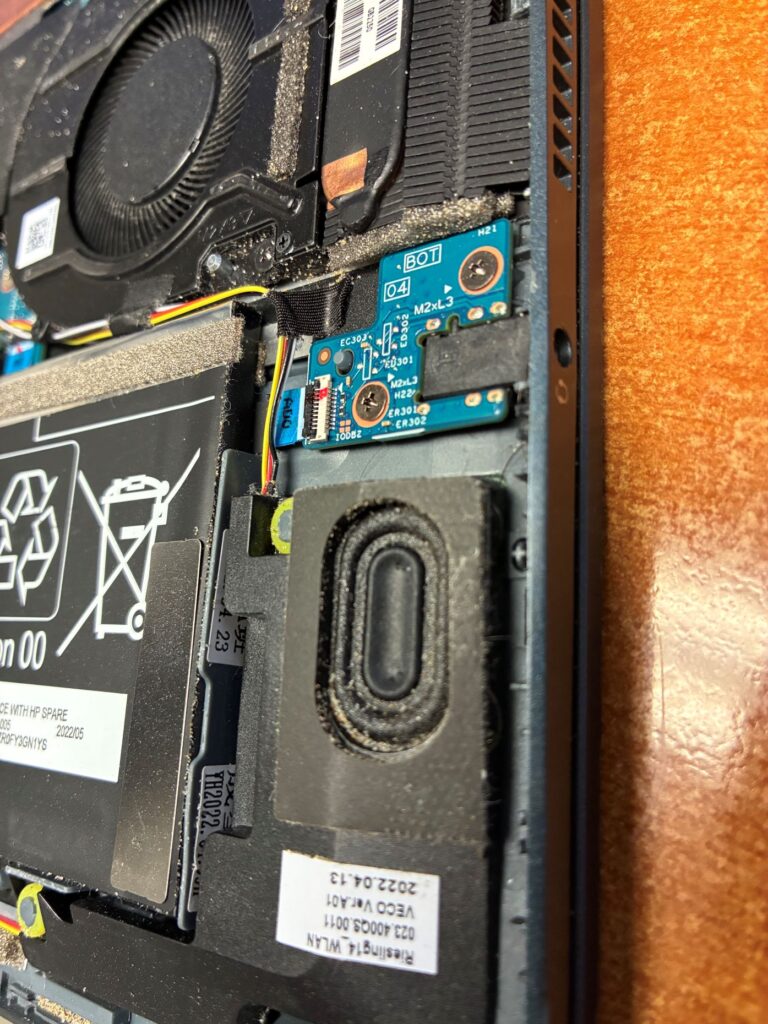
“I don’t know what happened, it just stopped working”. Huh, I have no idea. I guess that I will take a look and see if I can see anything. Oh, I see there is a bunch of sand in here that does not belong.
In years past, I have replaced a few RAM DIMMs, hard drives, disk drives, and the like. That doesn’t make me and expert in PC repair, it makes me a part swapper that has a little knowledge of what things are inside of the cover. Years ago, the motherboard would sometimes have some diagnostic LEDs as well as speaker beeps. The combination of those two tools would help steer you in the right direction.
I haven’t seen this problem in years but every so often, the motherboard battery would die and the PC would act like a failed hard drive. It seems like those batteries never die today, at least I haven’t dealt with it in my batch of ancient PCs. Once again, the onboard diagnostics were very helpful in resolving quickly.
When my son said that his computer makes a constant crackling noise and doesn’t stay connected to Wi-Fi, my first thought was that he dropped the thing and there was a loose connection. Dropping electronics is a very common occurrence that never happens with kids either.
Where to start with these things? I just turned it on. I noticed that there were a lot of updates that needed to be applied. That got me thinking about drivers. Sometimes not having the right driver installed can even have wildly erratic behavior. I didn’t see any driver updates that needed to be made. That did not make any sense.
First, this PC had not been on my network since before I made all of the upgrades in March. The location of his room was notoriously spotty because I fought with doorbell many times and his room is directly above that. I signed the computer into the network with new credentials and things seemed pretty stable. I think the Wi-Fi stability was just a phantom problem of a weak network signal.
Now to the crackling noise. It sounded like a static-y AM radio station at times. Although my son said it was happening constantly, I only heard it about five times in fifteen minutes for a couple of seconds. He said that it was much improved. I figured I would just let all the updates install and see what happened from there.
Meanwhile, I did some research into the internet. It seems like this problem is not unique. In all of my years as IT manager, I have never heard of it. Despite all of the claims of high dollar sound cards and meticulous checking of connections and power, most of the claims were resolved by disabling sound components in device management. I still think I need to get under the covers of this machine. I was still under the impression that it might have been dropped and has loose speaker connections.
When I took the back cover off, viola. Sand contains conductive material and at the very least, it doesn’t belong inside of a computer case. I took the compressed air to the motherboard and speakers and everywhere I can reach to blow it out. In hindsight, I think a vacuum is probably the best first approach because blowing the sand around risks jamming the particles deeper in the machine. When I turned it on, the crackling was gone.
End Your Programming Routine: When approaching a problem that is new or unusual, the first step is to take a look. Whether it is automobiles or CBs, it is amazing what the human can recognize as ‘not quite right’ even if you do not know how to fix the problem. In this case anybody other than a blind person should be able to recognize that sand doesn’t belong in a computer. In the future, I will be more insistent on making sure that my son performs basic troubleshooting steps before I get involved. This is how we combat a culture of ‘call a guy’ from completely taking over.
Recent Comments